Two years ago a cover story in Smartphone and Pocket PC magazine introduced the UMPC, and Samsung’s Q1 was the first to make it to market. At the end of the article, I asked if the new UMPC would replace the Pocket PC, or whether it would even survive as a platform. Samsung’s second generation device shows that the developers have been paying attention to user feedback. The new Q1 has impressive improvements that make it an attractive computing choice. Recently, at the Consumer Electronics Show, I observed several second generation entries and that more manufacturers were coming out with new models. Apparently the UMPC is gaining a significant foothold as a viable platform and computing alternative.

Outside: first impressions
First impressions and appearances reveal significant differences in the new Q1 compared to the original version. Perhaps most noticeable immediately is the QWERTY keyboard split on either side of the screen near the top. On the left is a joystick with mouse and Internet control buttons. On the right, is the navigation panel with an enter button, and below that are left and right mouse button keys.
Viewing the same seven inch screen is a more pleasurable experience now because instead of the 800 x 600 resolution, it has been bumped up to 1024 x 600 eliminating most sideways scrolling.
Another new feature is the fingerprint scanner on the lower left corner of the front panel. Instead of no camera on the first Q1, there are now two cameras, one in front, one in back.
Along the top, above the screen to the left are a series of indicators for power, battery, and wireless connections. On the left is a bank of four buttons for volume, and a menu for various system controls, and a handy UDF or user defined button. There are dual microphone pinholes at the bottom of the screen. A button that activates the camera is on the top right.
Gone is the CF port replaced by a standard SD card slot on the top of the unit accompanied by a 3.5 mm earphone jack and USB port. On the left is a lanyard connector, an AV Station button, and a locking power slider.
On the right side is the power input and a removable cover housing LAN, USB, and VGA ports. On the bottom right corner you will find the stylus silo. On the backside, there is a battery cover latch and a foldout stand.


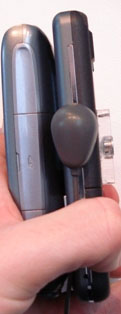 The Asus m536 "Treo Killer" does exactly what it's nickname purports. Not only does the Asus m536 rock the specs listed above, it packs all that goodness into a 13.9mm thick casing - considerably slimmer than the Palm Treo 750v. And, the Asus m536 does it with style. The flat, metallic navigation buttons paired with the flush-mounted touchscreen give the Asus m536 an air of elegance that you just don't get with Treo. The fingerprint-reader that doubles as a touch-sensitive directional pad only adds to the device's slick looks.