Sunday, July 20, 2008

10 Steps to Secure Your MacBook From Physical Data Theft

Sophos, a developer and vendor of security software and hardware, has released a white paper offering 10 steps to better protect your Mac notebook from data theft. Some steps include setting firmware password, seperate keychain passwords, filevaulted home folders, securely empty trash, and setup secure virtual memory.

The success of many data theft attacks depends more on the target system’s user and the way in which they work with their computer, than on which operating system they have chosen to install.

According to Sophos, “laptops are more susceptible to physical attack than desktop systems by their nature – because they are portable they are often taken out of the office and used to work from home, on the train or even in the local Starbucks.” Authored by Graham Lee, Senior Macintosh Software Engineer, this paper describes changes Mac users can make to improve the physical security of their laptops, discussing the context and benefits of each change.

From : http://www.palluxo.com/

Programs can help PCs, Macs get along

Q: I use a 1 GB USB flash drive to move files between my Windows laptop PC at work and my MacBook portable at home. But that doesn't work with the 160 GB external drive I use to back up my MacBook; my Windows laptop doesn't even recognize the external drive when it's connected. What's the problem?

The disk storage formats used by the Macintosh and Windows operating systems are different. While the Macintosh OS can read both its own file format and the one used by Windows, a Windows PC can read only PC files unless you add some third-party software that enables it to read Macintosh files.

My guess is your flash drive works between the Windows and Macintosh computers because you originally formatted it for Windows – making the flash drive readable by both the Apple and Microsoft operating systems.

Since your original use of the external drive was to back up files on the Macintosh, I'd say it's been formatted for the Mac's OS X 10.5 operating system, and that, as a result, your Windows laptop can't recognize the drive. To solve the problem, use a PC utility program such as MacDisk for Windows, which allows a Windows PC to read and write in the Apple operating system format.

Q: I'm trying to upgrade my Ad-Aware spyware removal program to the 2008 version, but the install function for the newer version keeps producing error messages. I then tried uninstalling the 2007 version, but got more error messages. Can I just delete the old program's file folder to get rid of it?

I suspect you can't uninstall the program because it's been damaged. Try reinstalling the 2007 version of Ad-Aware, which may repair the damage so you can uninstall the program in the normal way.

If you downloaded the 2007 program, you probably still have the installer program on your PC. To find it, search your hard disk for the term “Ad-Aware.” The icon for the installer file probably looks like a software box or a disk next to a computer.

Completely uninstalling the 2007 version of Ad-Aware is preferable to deleting its file folder. The uninstall function gets rid of all the program fragments that are strewn across your hard disk.

If reinstalling and uninstalling the 2007 version doesn't allow you to install the 2008 version, try downloading Ad-Aware 2008 again to make sure you've got a clean, error-free copy. You can download a free trial version of the 2008 program through www.download.com.

Steve Alexander, Minneapolis Star Tribune

From : http://www.charlotte.com/

PC Mag reviews Apple MobileMe: 4 out of 5 stars, ‘hard to beat’ for iPhone, Mac iLife users

"The hoopla around the Apple iPhone 3G launch has taken a lot of the thunder away from another major, though not completely unrelated, development at Apple: the unveiling of MobileMe. The reincarnation of Apple's .Mac online services is now available at $99 for individuals and $149 for a Family Pack. It's true that MobileMe does bring the new iPhone up to speed with push syncing for e-mail, contacts, and calendar as well as other features, but let's not forget .Mac's roots as a service for online storage, backup, e-mail, photo gallery, Web-page hosting, and remote control (Back to My Mac). In MobileMe, some of these latter features remain unchanged, and some disappear entirely," Michael Muchmore reports for PC Magazine.

"Note that I tested the service on the first day of availability, and I did run into the occasional snag... probably just a matter of Apple's servers settling in. In any case, access to mail and the other services seems entirely uninterrupted if you use the Mac desktop apps like Mail. Despite these birthing-pain issues, moving around the interface was quite snappy and desktop-like, thanks to its updated Web 2.0-style coding," Muchmore reports.

"The upshot is that iPhone and touch owners get more, but Web and desktop users get somewhat less. They do get slicker Web applications, drag-and-drop, and more powerful Web gallery options, but lose online site building and a few other crumbs," Muchmore reports.

"In the end, while, yes, you can get most of what MobileMe offers for free from Web services like box.net, Yahoo! Mail, and Picasa Web albums, [but] you can't get them all together in such a clean, elegant interface. And if you're an iPhone user or a user of Mac's excellent creativity apps like iWeb and iPhoto, the tight integration with the Mac makes MobileMe hard to beat," Muchmore reports.

Muchmore (ha, ha) in the full review here.

From : http://macdailynews.com/

Continue Nokia Tradition with Nokia E71, Which is Now Available at Despercia.com

New York, NY, July 20, 2008 --(PR.com)-- Nokia E71 - the latest email-optimized device from the Nokia Eseries product range. The sleek Nokia E71 with full QWERTY keyboard easily mobilize a broad range of personal or professional messaging needs, including Microsoft Exchange, the world's most widely adopted corporate email solution.

The Nokia E71 comes fully equipped for easy-to-install and easy-to-use professional and personal email. People who use Microsoft Exchange at work can access their email using the Mail for Exchange mobile email client, which comes pre-loaded with the Nokia E71.

Nokia E71 supports email accounts from more than a thousand internet service providers (ISPs) around the world, as well as Gmail, Yahoo! mail and Hotmail. Additionally, the Nokia E71 supports the Nokia Intellisync Wireless Email solution as well as third party email solutions like System Seven and Visto Mobile. The Nokia E71 comes with the new switch mode that allows people easily to switch between personal and work home screens.

In addition to email and personal information management, the Nokia E71 supports the latest Ovi services including maps, music and media sharing that power users expect from their device. This includes fast and seamless browsing with HSDPA, wireless LAN and 3G connectivity, Assisted GPS (A-GPS) and Nokia Maps for navigation, a music player with support for up to 8 GB expandable memory and a 3.2 megapixel autofocus camera.

Nokia E71 also comes fully equipped with a robust suite of enterprise grade features, including a built-in encryption functionality for both the device memory and for the memory card. The Nokia E71 also includes integrated mobile VPN support that gives mobile professionals access to their company intranet, and device lock and wipe to protect corporate information. Incorporating underlying technologies that allow IT departments to effectively manage security settings, corporate applications, data and advanced voice features, the Nokia E71 expands the range of Nokia Eseries devices that support enterprise-specific deployment.

To find out more about the Nokia E71 users may go to:
http://www.despercia.com/nokia-e71.html

For further information about device and solution availability, users may contact Despercia.com’s technical support directly at 1-646-619-2800.

About Despercia.com
With company’s launch in May of 2002, they have provided mobile solutions to consumers throughout the United States and the world. Their customers list continues to grow at an astronomical rate, exceeding even wildest expectations. Company’s sales figures continue to impress quarterly, and customers continue to return to Despercia to satisfy all their mobile technology needs.

From : http://www.pr.com

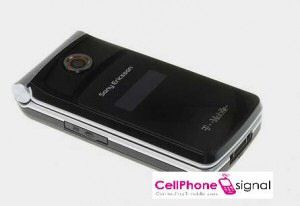
New colours on Sony Ericsson TM506 says T-Mobile

We are all aware that the Sony Ericsson TM506 mobile flip phone will be coming out in black on green, because it popped up of the FCC website. But maybe you are just not a green colour person, or you find the black on green a tad unsightly.

Well if you want the Sony Ericsson TM506 flip but are so put off but the colour, you may be pleased to know that the word is T-Mobile is to be offering this mid to high range 3G clamshell design mobile phone is a more restrained black on black and even black on white.

These alternate colour offerings on the Sony Ericsson TM506, which holds the codename Bella, will still be toting a 2 megapixel camera, web feeds reader for RSS, podcasts, news and the like, aGPS, along with support for dual band 3G UMTS/HSDPA frequencies.

Source – cellphonesignal

Struggling AMD Is Still Searching for Inspiration

"Uninspiring" is never a word a company wants associated with its
performance or its executive changes--or anything, for that matter. But
it's an apt description, used in a report Friday by Merrill Lynch &
Co. analyst Srini Pajjuri to describe microprocessor maker Advanced
Micro Devices Inc.'s (AMD) second-quarter financial results and the appointment of a new CEO.

The struggling chipmaker said late
Thursday that it will replace CEO Hector Ruiz with president and chief
operating officer Dirk Meyer. Ruiz, who will remain executive chairman,
has led AMD since 2002, when he took the reins from flamboyant founder
Jerry Sanders. Under Ruiz's leadership, the company did have a few big
wins against its arch-enemy, Intel Corp. (INTC). Its Opteron chips, for example, helped it gain a strong foothold in enterprise computing.

But
it's been a tough run for AMD over the past couple years. Product
stumbles and the 2006 acquisition of graphics processor maker ATI
Technologies Inc. have helped drive the company's stock price to new
lows. AMD paid $5.4 billion to purchase of ATI; analysts considered
that price much too high, and that belief has been borne out by several
goodwill writedowns, the latest of which was announced last week and brought the total charges against the deal to $2.56 billion.

As an article in the Wall Street Journal points
out, AMD's market cap is far below what it paid for ATI a couple years
ago. The company yesterday posted second-quarter revenue of $1.35
billion, a 10% decline from the previous quarter. This missed Merrill
Lynch's forecast, and AMD also announced third quarter guidance below
Merrill's expectations, Pajjuri wrote.

As for bringing in a new CEO, this seemed like a perfect opportunity to shake AMD up, kind of like Hewlett-Packard Co. (HPQ) wisely bringing in new blood by tapping Mark Hurd as its new chief.

But for
incoming AMD CEO Meyer, a 12-year veteran of the chipmaker, the general
thought is that the company is in for more of the same.

"While the CEO change could bring in a new perspective, we do not expect any drastic changes in the near term," Pajjuri wrote.

Wall Street seemed to agree Friday morning. Shares of AMD plunged 12%, to $4.66. Uninspiring, indeed.

From : http://seekingalpha.com/

The Five Most Embarrassing Moments of Nintendo's Presser

OK, and after this, I promise no more bashing on Nintendo's press
conference. But I used to work in internal PR for a very large software
company (that may or may not have produced products that rhyme with Shmorton Shminternet Shmecurity)
and we'd go to RSA, host our own user conference, all that stuff. What
I mean to say is that I've seen some eye-rolling moments in keynotes,
when top executives try to get hip. But I've never seen anything close
to this.

The -Minus World sums it all up with the five most embarrassing
moments. Yes, No. 1 is DJ Ravi flailing away like a toddler batting at
a mobile. But the other four are alternately hilarious/pathetic too,
and I think any one of them, by themselves, would have made it a
trainwreck.


Anyway, enjoy. See you back here tomorrow.


The 5 Most Embarrassing Moments of Nintendo's E3 Conference [The -Minus World, and pic]

Modder shoves emulator, ROMs into actual NES controller


This one has been around the block a time or two, but considering you have absolutely nothing else to do on a Sunday, you might as well dust off that DIY kit and get to work. What you're looking at above is a genuine (albeit modified) NES controller playing a bona fide classic on a laptop. Amazingly, all of the software required for such a marvelously good time is stuffed tight within the controller itself. Take a step back and digest that -- your very own NES emulator (with ROMs), shoved inside a Nintendo Entertainment System controller. Does it get any more awesome than that? Hit the read link to start building your own and let us know. Video of the action after the jump.

[Via Hack-A-Day and Engadget]